Understanding JavaScript Arrays: A Beginner's Guide
I'm a passionate Full Stack JS Developer focused on creating robust and efficient solutions. You'll find articles here covering my experiences with React/Next.js, Node.js/Express, TypeScript, and general development best practices. Let's talk code!
Javascript Array:
JavaScript array is an object that represents a colection of similar type of elements.
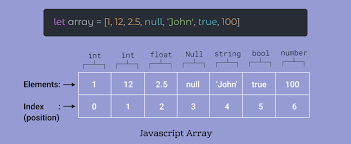
An JavaScript array has the following characteristics:
1. First, an array can hold values of mixed types. For example, you can have an array that stores elements with the types number, string, and boolean.
2. Second, the size of an array is dynamic and auto-growing. In other words, you don’t need to specify the array size upfront.
Creating JavaScript arrays
JavaScript provides you with two ways to create an array. The first one is to use the Array constructor as follows:
let arr1 = new Array();
The arr1 is empty ,which does hold any element.
If you know the number of elements that the array will hold, you can create an array with an initial size as shown in the following example:
let arr1 = Array(10);
To create an array and initialize it with some elements, you pass the elements as a comma-separated list into the Array() constructor.
For example, the following creates the arr1 array that has five elements (or numbers):
let arr1 = new Array(9,10,8,7,6);
However, when you pass a value of another type like string into the Array() constructor, you create an array with an element of that value. For example:
let arr1 = new Array(3); // creates an array with initial size 3
let arr2 = new Array(1, 2, 3); // create an array with three numbers 1,2 3
let arr3 = new Array('Yellow'); // creates an array with one element 'Yellow'
In practice, you’ll rarely use the Array() constructor to create an array. The more preferred way to create an array is to use the array literal notation:
let arrayName = [element1, element2, element3, ...];
The array literal form uses the square brackets [] to wrap a comma-separated list of elements. The following example creates the colors array that holds string elements:
const colors = [ "Red","Green","Yellow","Blue","White" ];
You can create a empty array using square bracket [] without specifying any element like this:
const emptyArray = [];
Accessing JavaScript array elements
Javascript Array starts from index-0. You can access any element of the array by referencing its index, which starts from zero:
let number = [1,2,3];

console.log(number[0]); //1
console.log(number[1]); //2
console.log(number[2]); //3
To change the value of an element, you assign that value to the element like this:
number[2] = "Hello";
number[0] = 9;
number[1] = true;
output:
[9,true,"Hello"];
Getting the array size:
you can find the length of an array using length property like this:
let number = [1,2,3,true,"hello",null];
console.log(number.length);
Basic operations on arrays
The following explains some basic operations on arrays.
1)Adding an element to the end of an array
To add any element at end of the Array you can use push() method like this:
let colours = ["Red","Yellow","White","Green",Blue","Black];
colours.push("Pink");
console.log(colours);
output:
["Red","Yellow","White","Green",Blue","Black","Pink"];
2) Adding an element to the beginning of an array
To add any element at the beginning of the Array you use the unshift() method.
let colours = ["White","Green",Blue","Black","Pink"];
colours.unshift("Gray");
output:
["Gray","White","Green",Blue","Black","Pink"]
3) Removing an element from the end of an array
To remove an element from the beginning of an array, you use the shift() method:
let colours = ["White","Green",Blue","Black"];
lastElement = colours.pop();
console.log(lastElement);
output:
["White","Green",Blue"]
4) Removing an element from the beginning of the array in Javascript we can use shift() method to remove element from the beginning like this:
let colours = ["White","Green",Blue","Black","Pink"];
console.log(colours.shift());
output:
["Green",Blue","Black","Pink"]
5) Finding an index of an element in the array
We can find index of an element using indexOf() method like this
let colours = ["White","Green",Blue","Black","Pink"];
console.log(colours.indexOf("Blue")); //output is 2
6)Check if an value is in an array To check if an value is in an araay,we can use isArray()method:
const array = [1,2,5,6,8,9,4,5,2,4,1,3,5];
console.log(array.isArray(5)); //True